
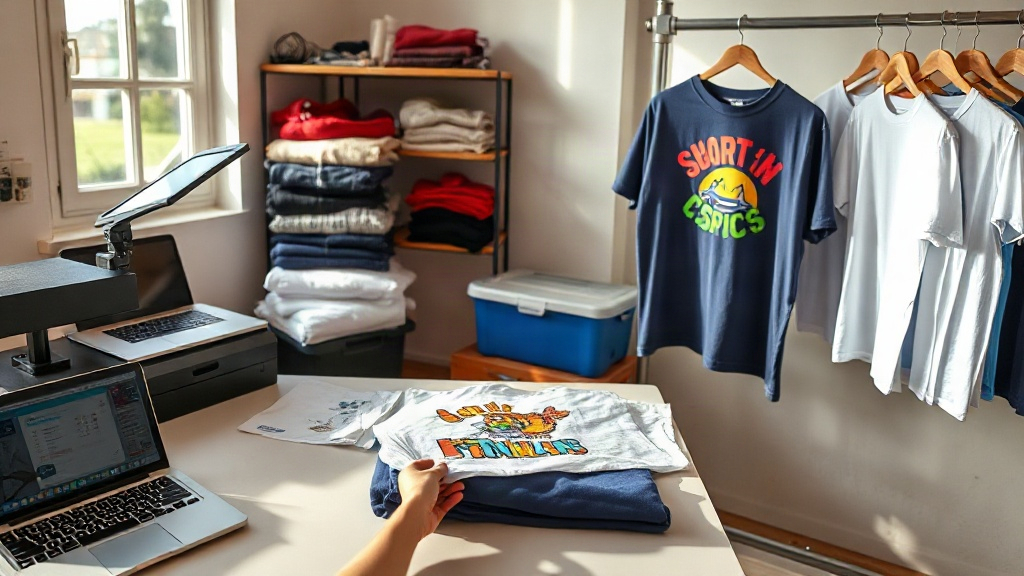
Creating custom t-shirts is one of the most rewarding DIY projects you can take on. Whether you're making a shirt for yourself, a team, or a small business, the process combines creativity with hands-on satisfaction. I've been printing shirts for over a decade, and I still get a thrill every time a design comes to life on fabric. This guide will walk you through everything you need to know, from picking the right blank to choosing a printing method that suits your needs.
Why Custom T-Shirts Are Worth the Effort
Store-bought shirts are convenient, but they lack personality. Custom t-shirts let you express your style, promote your brand, or celebrate a special occasion. They also make thoughtful gifts that people actually wear. Beyond that, printing your own shirts can be a side hustle or even a full-time business. The market for personalized apparel is huge, and with a bit of practice, you can produce results that rival professional print shops.
Choosing the Right Blank T-Shirt
The foundation of any great custom shirt is the blank itself. Not all blanks are created equal, and the wrong choice can ruin an otherwise perfect print. Here's what to look for.
Fabric and Weight
Cotton is the most popular choice for its softness and breathability. Ringspun cotton is even softer and takes prints well. For a heavier feel, look for blanks in the 5.5 to 6.5 oz range. Lighter fabrics (4 to 5 oz) are great for summer but may not hold up as well over time. If you want a premium feel, consider combed cotton or a cotton-poly blend.
Fit and Style
T-shirts come in many cuts: crew neck, V-neck, fitted, relaxed, long sleeve, and more. Think about who will wear the shirt and for what occasion. A corporate event might call for a classic crew neck, while a trendy boutique might prefer a fitted style. Always order a sample to check the fit before committing to a large order.
Color Matters
Light-colored shirts are forgiving for beginners because you can print dark designs without a white underbase. Dark shirts require a white underbase for vibrant colors, which adds complexity. Start with white or light gray if you're new to printing.
Popular Printing Methods for Custom T-Shirts
There are several ways to get your design onto a shirt. Each method has its pros and cons, and the best choice depends on your budget, quantity, and design complexity.
Screen Printing
Screen printing is the industry standard for bulk orders. It involves creating a stencil (screen) for each color in your design, then pushing ink through the mesh onto the fabric. It's cost-effective for large runs, and the results are durable and vibrant. However, setup costs make it less ideal for one-off shirts. If you're printing 50+ shirts with a simple design, screen printing is hard to beat.
Direct-to-Garment (DTG) Printing
DTG works like a specialized inkjet printer for shirts. It's perfect for full-color, detailed designs and small batches. No setup fees mean you can print a single shirt without breaking the bank. The catch? DTG inks can fade faster than screen-printed inks, and the hand feel is a bit stiffer. Pre-treating the shirt is essential for good results, especially on dark fabrics.
Heat Transfer Vinyl (HTV)
HTV is a favorite among crafters. You cut your design from a sheet of vinyl, weed out the excess, and press it onto the shirt with a heat press. It's great for simple, single-color designs and works well for personalizing shirts at home. HTV comes in many colors and finishes, including glitter and metallic. The downside is that intricate designs can be time-consuming to weed, and the vinyl can peel if not applied correctly.
Direct-to-Film (DTF) Printing
DTF is a newer method that's gaining popularity. You print your design onto a special film, coat it with adhesive powder, and heat press it onto the shirt. It works on almost any fabric, including cotton, polyester, and blends. DTF offers vibrant colors and fine details without the need for pre-treatment. It's a great option for small businesses that want versatility.
Design Tips for Stunning Custom T-Shirts
Even the best printing method can't save a poorly designed shirt. Keep these tips in mind when creating your artwork.
- Keep it simple: Bold, clean designs often look better than busy ones. Remember that a shirt is a small canvas.
- Use high-resolution images: Vector files (AI, EPS, SVG) are ideal because they scale without losing quality. If you're using raster images, aim for at least 300 DPI at the final print size.
- Consider the shirt color: Your design should contrast well with the fabric. A dark design on a dark shirt will be hard to see.
- Think about placement: The most common spot is the center chest, but you can also print on the back, sleeves, or even the hem. Just make sure the design fits the area.
- Test before you commit: Print a sample on a similar fabric to see how the colors and details translate.
Step-by-Step: How to Make a Custom T-Shirt at Home
If you're ready to try your hand at making custom t-shirts, here's a simple workflow using HTV, which is the most beginner-friendly method.
- Choose your blank: Pick a cotton or cotton-poly shirt in the color you want.
- Create your design: Use design software like Canva, Adobe Illustrator, or Inkscape. Remember to mirror your design if you're using HTV (unless you're using a specialty vinyl).
- Cut the vinyl: Load your vinyl into a cutting machine (e.g., Cricut or Silhouette) and cut according to your design.
- Weed the vinyl: Remove the excess vinyl, leaving only your design on the carrier sheet.
- Preheat the shirt: Press the shirt for a few seconds to remove moisture and wrinkles.
- Apply the design: Place the vinyl on the shirt and press according to the vinyl manufacturer's instructions (usually 305°F for 10-15 seconds with medium pressure).
- Peel and enjoy: Wait for the vinyl to cool (or peel hot, depending on the type), then remove the carrier sheet. Your custom shirt is ready to wear!
If you're using a service like Smart Blanks Market to source your blanks, you can focus on the fun part: designing and printing. They offer a wide range of high-quality blanks that are perfect for customization.
Common Mistakes to Avoid
Even seasoned printers make mistakes. Here are a few pitfalls to watch out for.
- Not pre-treating dark shirts for DTG: Without pre-treatment, the ink won't adhere properly and will fade quickly.
- Using the wrong vinyl for the fabric: Some vinyls are designed for cotton only; using them on polyester can cause scorching or poor adhesion.
- Applying too much pressure: This can cause the ink to spread or the vinyl to flatten, ruining the design.
- Skipping the test print: Always do a test run on a scrap piece of fabric to dial in your settings.
- Ignoring care instructions: Teach your customers to wash their custom shirts inside out in cold water and avoid ironing directly on the print.
Frequently Asked Questions About Custom T-Shirts
What is the best printer for custom t-shirts at home?
It depends on your budget and needs. For occasional crafting, a heat press and a cutting machine (for HTV) is a great start. For small business use, a DTG printer or a DTF printer offers more professional results. If you're just starting, consider outsourcing to a print-on-demand service until you build up demand.
How do I make my custom t-shirt design last longer?
Wash the shirt inside out in cold water and tumble dry on low or hang dry. Avoid ironing directly on the printed area. For HTV, wait at least 24 hours before the first wash to let the adhesive fully cure. Proper care can extend the life of your custom shirt for years.
Can I print on 100% polyester shirts?
Yes, but you need to use the right method. Dye-sublimation works best for polyester, as the ink bonds with the fibers. DTF also works well on polyester. HTV made for polyester is available, but you must use lower heat settings to avoid scorching. Screen printing on polyester requires special inks and careful curing.
How much does it cost to make a custom t-shirt?
The cost varies widely. A blank shirt can range from $2 to $10, depending on quality and brand. Printing costs depend on the method: HTV might cost $1-$3 per shirt for materials, while screen printing setup can be $20-$50 per color plus a few dollars per print. DTG and DTF have no setup fees but higher per-print costs. Always factor in your time and labor if you're selling.
Where can I buy high-quality blank t-shirts for printing?
Look for reputable suppliers that specialize in blanks for printing. Smart Blanks Market is a great option, offering a curated selection of shirts that take prints well. You can also find blanks at local craft stores or online retailers, but be sure to read reviews and order samples to test print quality.
With the right tools and a bit of practice, you'll be turning out professional-looking custom t-shirts in no time. Start with a simple design, choose a method that matches your scale, and don't be afraid to experiment. Happy printing!